Showing posts with label walking. Show all posts

Monday, November 19, 2012

Something to smile about: A 5,000-mile walk across Asia, guided by Google Maps

(Cross posted on the Official Google Blog)

Inspiration comes in many shapes and forms. For U.S. Marine Sgt. Winston Fiore, it was a news article about the International Children’s Surgical Foundation (ICSF) and Dr. Geoff Williams, who provides free facial-reconstructive surgeries for children with cleft lips/palates in developing countries. Although cleft palates are quite correctable, if left untreated the deformity can cause serious health issues. Many children don’t have the surgery because the cost of each procedure ($250 USD) is out of reach for their families.


Inspired to do something to help, Winston set out on a 5,000-mile trek across Southeast Asia to raise money and awareness for the ICSF—a mission he dubbed Smile Trek. Armed with sturdy boots, a 20-pound vest carrying essentials and an Android phone with Google Maps, Winston set off on his mission in October 2011. In the last year, he has walked (yes, walked!) through Brunei, China, Laos, Malaysia, Philippines, Singapore, Taiwan, Thailand, and Vietnam. Along the way he’s met countless individuals who have contributed to his cause, whether it was a place to stay, a hot meal or a monetary donation on his website.


Trekking along: Winston, standing in front of a durian fruit stand near Sematan, the westernmost town of Malaysian Borneo

Out on the road, Winston’s Android phone and Google Maps became “the hub” of his entire operation. He used Google Maps to find accurate and easy-to-use walking directions everywhere he went, whether it was through remote villages and farms, down tiny dirt roads, or across rice paddies and desolate sugar cane fields. “Walking directions in Google Maps were critical to my trek. The directions were accurate and efficient—it’s essential to take the shortest route when you’re walking 20-25 miles each day,” said Winston. “But the best part was being routed onto roads and trails through areas I otherwise never would have discovered with, say, driving directions, or even a physical map.”


View the complete map of Winston's journey on his site.

In addition to using Google Maps, Winston relied on many other Google products during his trek. He used Google Latitude to keep his family, friends and supporters informed of his whereabouts, and MyTracks to record his speed, distance and the places he visited. He also used Google Translate to communicate with locals, and in one case found it essential: when bit by a stray dog outside of Bangkok, he typed "I got bit by a dog, can someone take me to a hospital?" into his app. A taxi driver took him to the hospital, where he got 11 shots!

Today, after walking 5,000 miles in 408 days, Sgt. Fiore completes his journey, with more than $65,000 raised for ICSF. The money will help to fund more than 200 life-saving surgeries for children in Southeast Asia and other parts of the world. If you’d like to contribute to the International Children’s Surgery Fund and Winston Fiore’s effort, we encourage you to visit: http://smiletrek.org

Wednesday, July 11, 2012

Google Maps for Africa gets better - walking directions launched!

(Cross Posted from Google Africa Blog)

In 2010, we announced the availability of driving directions on Google Maps in many African countries. This is a feature that allows users to get driving direction information from one location to another (e.g from Kotoka International Airport to Hotel Novotel in Victoria Borg, Accra in Ghana)

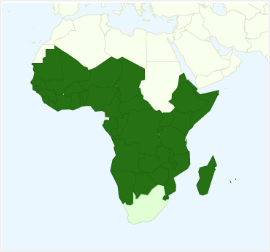
But of course not everyone drives or always needs to drive, so today we’re bringing walking directions for 44 African countries!


To get walking directions, start by doing one of the following:

  1. Click Get directions, enter a starting and ending location and click Get Directions.
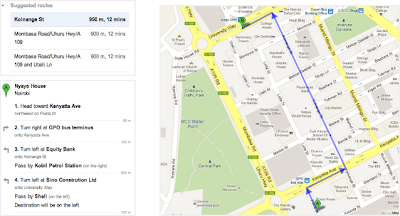
  2. In the search field, enter a from-to statement (example: from Nyayo House to Anniversary Towers) and click Search Maps.
  3. Click "Directions" in an info window that pops up for a business or location
  4. Right-click on the map to get directions to that location


Click on the “walking” icon at the top


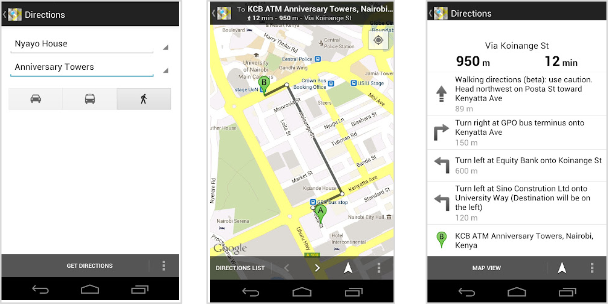
Walking directions are also available on Google Maps for Mobile.


Try out the walking directions today. As a reminder, walking directions are currently in beta, and we recommend that you use caution, as the routes may be missing sidewalks or pedestrian crossings. Walking directions are editable, so if anything is amiss, you can correct it with our community mapping tool Google Map Maker. Google Map Maker is a tool that allows you to add and update geographic information for millions of users to see in Google Maps and Google Earth.

We are always grateful to our active African online cartographers who have helped make our African maps what they are today.

We hope you enjoy using walking directions on Google Maps!

Wednesday, May 9, 2012

Shop and travel smarter with Google Maps 6.7 for Android - now with Google Offers and indoor walking directions

(Cross-posted on the Official Google Mobile Blog)

Wherever you are, Google Maps for Android helps you get around and discover new places. Today with the 6.7 release we will help you find offers from nearby businesses in the U.S. -- everything from restaurants, to salons, to city tours. Also, we’ve added indoor walking directions in the U.S. and Japan, plus 360-degree interior photos of businesses, to help you intrepidly make your way indoors and out.

Discover great offers near you

Today, in the U.S. only, we’re launching a way to discover nearby Google Offers in Google Maps for Android. To see great deals near you, tap on “Maps” to open the dropdown menu and then tap on “Offers.” If you see something you like you can click on it to learn more. Some Google Offers can be purchased and saved for later while others are immediately available for free. With free Google Offers, press “Use now” to redeem instantly or “Save for later” for future use. You can also opt-in to receive notifications in the app when there are offers near you.


Explore the great indoors with walking directions and Business Photos.

Since we launched indoor maps in the U.S. and Japan in Google Maps for Android last November, business owners have been adding their floor plans to our maps with Google Maps Floor Plans. Today, we are launching indoor walking directions for participating venues in these countries. This will help you get directions not only to a building’s front door, but also through those doors to the places where you want to go inside.

Indoor walking directions
Get Indoor walking directions in indoor maps (photo: Macy’s San Francisco)

With Google Business Photos you can explore panoramic photos of the inside of a business from the palm of your hand. Now you can get a feel for a restaurant or store inside as well as outside using Street View technologies. To access these 360-degree panoramic views, look for the “See Inside” section on the Place page of select businesses.

Business Photos
See the interior of participating businesses with Business Photos (photo: Toyjoy)

Download Google Maps 6.7 for Android from Google Play, and use it as your trusted guide to help you find and discover places to eat, shop and play! You can also learn more about other great features on the Google Maps YouTube channel.

Thursday, November 3, 2011

Share biking and walking directions with Custom Maps


Attention avid bikers and walking enthusiasts: You can now use your desktop to create a biking or walking itinerary using Custom Maps in Google Maps. You can choose to share these directions by allowing people to view your Custom Map and avoid the hassle of scribbling them down or printing them out. Additionally, you can access these stored directions from your phone with the Google Maps Android application.

This provides a quick and easy way to navigate trips that have multiple routes and stops when you’re on-the-go. Give it a try the next time you plan a group bike ride or to keep track of your favorite jogging routes.

To start, first get directions to your destination(s) and select the biking or walking icon in Google Maps. Next, scroll down to the bottom of the directions in the left-hand panel and click the “Save to My Maps” link.


You can then save the directions to an existing custom map or create a new one. Once the directions have been added to a custom map, you can continue to insert extra stops or make notes. After you complete mapping out your itinerary, you can choose to share it with friends or a workout buddy.


If you have an Android-powered device, you can access stored directions in Custom Maps right from your mobile phone - just click on the layers icon in the upper toolbar and select the saved Custom Map you want.

If you don’t have an Android phone, you can open your Custom Maps using your phone’s browser and visiting maps.google.com.


For more tips on custom maps, visit our help center.

Thursday, January 6, 2011

Walking Speed Predicts Life Expectancy


Warren St., Charleston, S.C.

How fast you walk may predict life expectancy. Now, here is a study I like!

I've always walked fast because I walked to actually get somewhere. It sounds like a "grumpy old man" story but I really did walk three miles each way to high school. We took short cuts through the woods and climbed hills and were still faster than the pokey bus route.

I don't know how to amble or stroll. You need to tie a rope around my belly and hold me back if you plan on a lazy walk with me. One of the hardest things about having small children and toddlers was never being able to take a brisk stride without picking them up and carrying them.

I am always so pleased to find people who match my pace. According to this study, I should live a long time - unless I break a leg first.

Sunday, July 25, 2010

The little people left their toys out


John St., Charleston, S.C.

The little people left their toys out. Check the larger version.

In other news, you know I am a walking nut. I grew up walking miles every day. I march briskly and endlessly around the Charleston peninsula with the odd field trip through swamps and cemeteries. I've spent vacations hiking across countries. On occasion I like to share good walking quotes and thoughts by my fellow walkers.

Here is an article on walking that I spotted in the Guardian UK yesterday:

This column will change your life: A step in the right direction.

Thursday, March 11, 2010

On Thin Ice!


Yesterday, the sun was shining and the skies were clear and blue. So, I decided to take Howard for a brisk walk on the other side of the River Vistula to see the ruins of a Teutonic castle...but we never made it!

We started walking down what we thought was a natural path. As we walked further and further...we started to notice cracked ice and water all around us. We soon realised that we weren't actually standing on a natural path...but rather a natural tributary of the River Vistula!! With the sun shining and the ice melting...we decided not to hang around too long!

Thursday, January 28, 2010

A Snowy Walk!

The title says it all! Wind + snow = a damn difficult time outside!! ;-)

Tuesday, November 10, 2009

Drip, drip...


Charleston, S.C.

Everything is dripping today. The sky, my nose.....

I took one more day off since I still sound so congested. Tomorrow I have to go to work so perhaps I'll just put a Quarantine sign on my door and get a lot done.

My gift for you today is a link to a self guided Charleston walking tour. This one is on a real estate page but it looks pretty good. You can print it out and tuck it in your pocket next time you are walking the historic district.

Walking Historic Downtown Charleston

Saturday, July 12, 2008

Promenade

[click image to enlarge]

Wollaston Beach is a popular place to walk on a summer evening.